

nginx宝塔面板如何配置跨域?
分享
宝塔 Nginx 跨域问题Access-Control-Allow-Origin 的解决方案
1. 如果是使用nginx作为服务器的:
打开网站的设置,然后找到配置文件,添加如下代码:
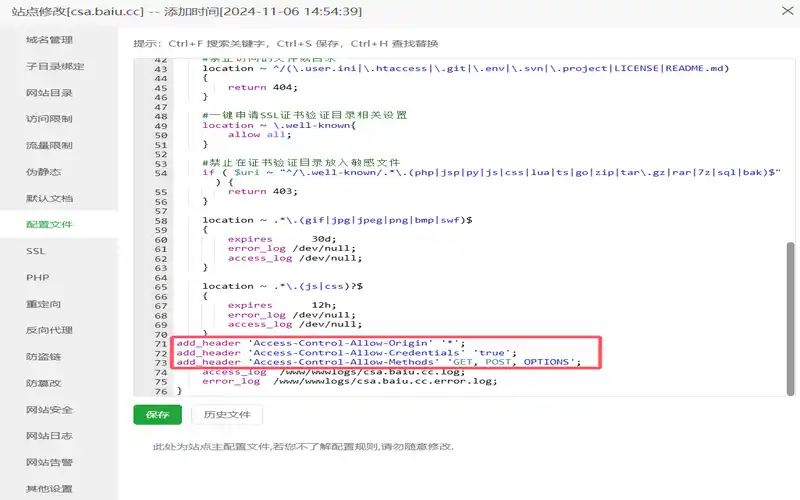
- add_header 'Access-Control-Allow-Origin' '*';
- add_header 'Access-Control-Allow-Credentials' 'true';
- add_header 'Access-Control-Allow-Methods' 'GET, POST, OPTIONS';
添加完之后,记得重启 nginx。
如果你需要指定特定域名的跨域请求时,可以在 Access-Control-Allow-Origin 中明确写出允许的域名。这样做可以增加安全性,避免不必要的跨域请求。以下是如何修改你的 Nginx 配置来实现这一点的例子:
location / {# 只允许来自 指定https://域名.com 的跨域请求if ($http_origin ~* (http://2.baiu\.cc|https://ttmoban\.com)) {add_header Access-Control-Allow-Origin $http_origin;add_header Access-Control-Allow-Credentials 'true';}# 允许特定的请求方法add_header Access-Control-Allow-Methods 'GET, POST, OPTIONS';# 允许特定的请求头字段add_header Access-Control-Allow-Headers 'Authorization, Content-Type';# 处理预检请求if ($request_method = 'OPTIONS') {add_header 'Access-Control-Allow-Origin' $http_origin;add_header 'Access-Control-Allow-Methods' 'GET, POST, OPTIONS';add_header 'Access-Control-Allow-Headers' 'Authorization, Content-Type';add_header 'Access-Control-Allow-Credentials' 'true';add_header 'Content-Length' 0;add_header 'Content-Type' 'text/plain charset=UTF-8';return 204;}}








回帖 ( 0 )